Stop collecting tutorials and start collecting gear that works together. Choose your first synth with confidence, wire it into your DAW, and design your first original sounds — one clear roadmap, from complete beginner to a fully connected hardware setup.
Sound familiar? Hours of tutorials watched, wishlists full — and still no synthesizer on your desk.
It's not your fault. Every video contradicts the last one, every forum swears by different gear, and spending €500 on the wrong synth feels like a real risk. So you keep researching — and the studio in your head stays imaginary.
This course isn't another opinion to add to the pile — it's one structured roadmap: from choosing your first synth, to connecting everything, to recording your first original sounds in your DAW.
Even if you're a complete beginner — we start with what a synthesizer actually is and build up from the ground, one module at a time.
Even if you're afraid of buying the wrong gear — SynthFinder and the buying module match you to the right synth for your goals, sound and budget.
Even if the technical side scares you — audio, MIDI, interfaces and routing each get their own dedicated lesson, so nothing stays a mystery.
8 Modules & 19 Individual Lessons — from zero to a working studio in 4h 8m+. No filler, no forty-hour marathon.
See the whole journey before you spend a cent. Where you're starting, what you'll learn, what you'll buy and what you'll build — so every step you take has a reason.
What a synthesizer actually does, and the building blocks every synth shares: oscillators, filters, envelopes and modulation — explained so they finally stick.
Analog, digital, mono, poly, semi-modular — every synth type decoded, then matched to your goals, sound and budget. With SynthFinder doing the heavy lifting.
Audio, MIDI, interfaces, cables and your DAW — every connection explained, so your synth sits in your setup instead of next to it. Set up, synced and recording.
Full sound-design sessions where we build basses, plucks, pads and leads from scratch on real hardware — explaining every decision along the way.
Sound designReverb, delay, chorus, drive and more — what each effect does, when to reach for it, and how to mix your synth sounds so they sit right in a track.
Effects & mixingThe music theory that actually matters for synth players — scales, chords and patterns you can hear — so your patches turn into music.
Ready to scale? Expanded routing, more gear and a workflow that grows with your skills — so your first studio never becomes your last.
Advanced studio workflowA hundred YouTube reviews tell you what's good. SynthFinder tells you what's right for you — the interactive tool that matches you to your first synth.
I built SynthFinder because “which synth should I buy?” is the question I get more than any other — and the honest answer is always “it depends”. So I turned the answer into a tool: your goals, your sound and your budget in — the synths that actually fit, out.
Answer a few questions, get your matches, compare them side by side — then buy once and buy right. No install, no login dance, works on desktop, tablet and phone.
The DAW lessons are taught in FL Studio — and every concept transfers to every major DAW. No prior synthesis experience or music theory required.
Ableton Live
FL Studio
Logic Pro
Cubase
Studio One
Reaper
BitwigI'd rather you skip this than buy the wrong thing. Here's who gets the most out of it — and who doesn't.
You want a working studio, not a bigger watchlist.
No hard feelings — better to know now.
Not sure? Enroll, watch the first two modules, and decide from inside. You have 30 days to get every cent back.
Self-paced and hosted on SynthSkool — watch whenever and wherever you want, on any device, for life.
The lessons teach you the skills — the bonuses make sure you never get stuck choosing gear or wiring things up.
One-time payment, lifetime access, 30-day money-back guarantee — whichever you pick.
I'm confident this course will save you months of research — and every cent you'd have wasted on the wrong gear. If after 30 days it isn't for you — you get 100% of your money back. No questions asked. Just send an email to info@synthskool.com.
Fair question — I publish free synth content myself. Free videos are great for single tricks, but they're scattered: every creator starts from a different point, recommends different gear, and nobody walks you through the whole journey in order. This course is one structured path — choosing, connecting, designing, recording — in the right order, at play-along pace. If free videos alone got you there, you'd already have a studio.
Yes — that's exactly the point. The course starts before the purchase: you'll learn what synths actually do, which type fits you, and use SynthFinder to choose yours. Buying your synth happens inside the roadmap, not before it. Starting today means starting ahead.
It's a browser app I built that turns “which synth should I buy?” into a two-minute answer: tell it your goals, sound and budget, and it matches you across 45+ current synths — with side-by-side comparison, based on hard facts instead of sponsored hype. It's normally $49 on its own, and it's included with your enrollment at no extra cost. Nothing to install; it runs on desktop, tablet and phone.
Checkout runs through Gumroad. Right after your purchase you get instant access to the course on SynthSkool — your login details are sent to the email you used at checkout. You can start watching within minutes.
Payments are handled securely by Gumroad. You can pay with all major credit and debit cards as well as PayPal, depending on your region. Prices are shown in USD — Gumroad converts to your local currency at checkout.
Simple: 30 days, 100% money back, no questions asked. If the course isn't for you, send an email to info@synthskool.com and you get a full refund.
Yes. You pay once and keep access to the course and all bonuses forever — including any future updates to the material. No subscription, no recurring fees.
Yes. The buying module then works as a second-opinion check — or as your shortcut to synth number two — and everything else applies directly to the synth on your desk: setup and signal flow, recording it properly, sound design, effects and the music theory to make it all musical. You'd simply move faster through Module 3.
The one that fits you — there's no sponsor and no affiliate agenda behind the recommendations. The buying module teaches you how synth types differ, and SynthFinder matches current models to your goals, sound and budget. The decision stays yours; you'll just finally make it with confidence.
No. We start from what a synthesizer actually is and build everything from the ground up. And for the musical side, Module 7 covers exactly the theory you need to make musical sounds — no background required.
Any. The DAW lessons are taught in FL Studio, and every concept — routing, recording, MIDI setup — transfers to Ableton, Logic, Cubase, Studio One, Reaper, Bitwig and more.
Another six months of research won't put a synth on your desk — four hours and one roadmap will.
Building your first studio shouldn't feel like a gamble.
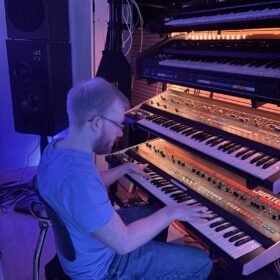
I'm Kleemann — producer, synth nerd, and the one person behind SynthSkool. You may know me from the Most Epic Synth series: over 200 live performance videos with more than 10 million views.
Every lesson in this course is filmed in my own studio, and SynthFinder is something I built because “which synth should I buy?” deserves a better answer than another opinion.
No team, no ghostwriters, no gatekeeping. If you email me, you get me.